profile
ϡ the name is Ian...ϡ im a musician by heart...
ϡ so gonna be an artist...
ϡ loves 3 dots...
ϡ LOVES to be msged...
ϡ is rojak...
ϡ loves abbrev.'s...
Wednesday, November 17, 2010


Here is my wallpaper.
Isnt fantastic but i did put alot of effort in it.
These are the major step in completing this e-wallpaper :

First a background was chosen. That background was adjusted to make the colour look more vibrant. I played with the contrast and the brightness of the picture and also the curves. After that, another background was too chosen but this time the blending mode was set to OVERLAY, which gave a very soft add to the picture but enhances the green colour. Then the another background was added with the same layer style. Both the pictures were scaled and placed in their desired spots.
After that,

I used to patch tool to make the footer of the picture brighter by patching it with the header of the picture. That improved it slightly but not as much as i wanted it too, so i used the clone stamp tool to clone the top and put it at the bottom. Then i used a soft eraser to erase the straight lines to make it more presentable.

Nice. Then minor adjustments were made to make it look like as if it was there already.

After that, seperate pictures frm the internet are chosen and their background are masked out. The most common masking technique i used it the magic eraser tool. The other one is the magnetic lasso tool which is very useful for curves and for other simple things i simply erase it freely.
Once the background for each image is masked out, i simply drag and drop the picture in my wallpaper. After that i hit CTRL T to bring up the transform options then i scale it up or down.
The step were repeated using various pictures from everywhere.

Sometimes by changing the blend mode to OVERLAY or something just turning the opacity down, as seen on the top picture.

After blending few images inside. It can be seen that there are a few too bright spots in the picture due to overlaying and adjusting of colour. So what i did was select the burn tool and burned the bright spots to make it darker.
After i did that, i burnt the body of the Hornbill Rhino bird to make it look blacker and nicer.
And this was the outcome :
Just the way i like it.
But after burning to body of the bird, i realised the eyes werent attractive enough, so all i did was select the ART HISTORY BRUSH tool and just went over the eyes to make it return to its original attractive state.
After this,
2 of the instruments were give a glow effect to beautify the picture. After that, text was added. The font is called RAINFOREST which gives a rainforest effect. That too was glowed to make it stand out in the picture. This is how the glow was done.

Set the blending mode to screen, choose the colour to white and adjust the opacity. After that the spread and size was adjusted to my liking. And set the contour to half round to make it glow more.
And after all text is put in, there you have it!!
my E WALLPAPER...
Thank you thank you!!
Wednesday, November 17, 2010,7:57 PM |
comment |
0 comment(s)
Sunday, November 14, 2010

To initiate my wallpaper, some preparations had to be made. I went through picture of rainforest's and instruments, played a few aboriginal instruments to get the feel of the wall paper and then i started sketching.
Here are my sketches :


and i chose this sketch :

Await the process.
Sunday, November 14, 2010,10:27 PM |
comment |
0 comment(s)
Friday, October 29, 2010
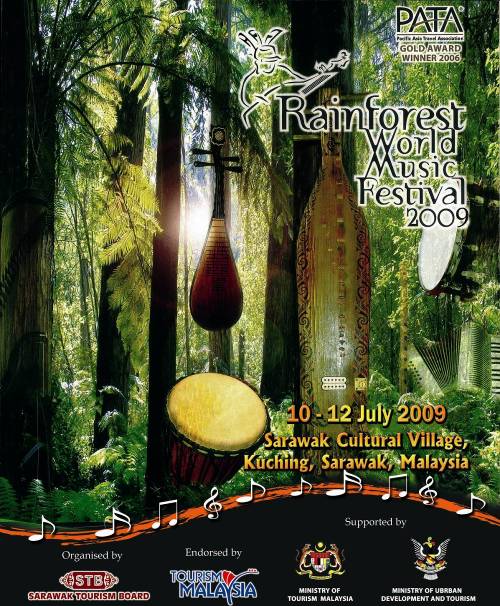
i think i might have chose my desired festival for assignment...
it is the Rainforest World Music Festival...
simply because i am a musician myself, i have been to this festival and my father's band has performed in this festival... so i have a clearer picture of what the festival is and what it is all about...
is this accepted??
thanks...! :)
Friday, October 29, 2010,8:29 PM |
comment |
0 comment(s)
Tuesday, October 12, 2010


As you'd prolly figured out, this is kinda like my signature photoshop thingy muh jiggy...
whaddup!
im ian...!!
this is my CG blog...
this is some of my latest photoshop stuff which i like...

BEFORE

AFTER

BEFORE

AFTER


im no pro, but i do the best i can... =D
for the full range of my works : im here too : http://orangecowtheian.webs.com/
=D
Tuesday, October 12, 2010,11:22 AM |
comment |
0 comment(s)